Livestreaming the NIME 2026 Conference
Published:
This June, our lab co-hosted the New Interfaces for Musical Expression conference at Loughborough University London.
Jordie Shier and I were the Hybid Chairs for this conference, livestreaming paper presentation sessions (dual tracks) from 9am to 5pm each day and concerts from 7pm - 11pm across 2 venue spaces over at Rich Mix.
Below is an overview of the streaming setups that we used. This shouldn’t necessarily be seen as a perfect guide to livestreaming a conference (there’s definitely room for improvement!) but in the preparation for this conference I found other guides (such as Charles Martin’s Hybrid Conference setup) very useful to reference so hopefully this one can provide some useful information too.
For all of the streaming, we used OBS to stream to YouTube.
Papers Track
This was the first time that NIME was a dual track conference, meaning that we needed to facilitate 2 simultaneous livestreams.
Each setup was similar (though with a different model of vision mixer in each room due to what we had available). In each room, we had the following requirements:
- HDMI from presenter’s laptop going to projector and livestream
- Audio from either HDMI or 3.5mm analogue stereo jack going to room speakers and livestream
- Camera showing presenter
- Wireless microphones going to room and livestream
- Remote presenters able to present over Zoom (and hear questions from the wireless mics in the room)
- Video playback of pre-recorded remote presentations when required
The rooms had HDMI inputs for the projector but no analog audio inputs, meaning that we needed to use the vision mixers to embed the analogue audio into the HDMI feed. If we hadn’t needed analogue audio input, a cheaper option may have been an HDMI capture card with an HDMI through to feed the projector.
Jordie and I came up with the following setup after some trial and error and test streams. We used a Blackmagic ATEM Mini Pro vision mixer in one room and a Roland V-8HD vision mixer (with a Rode HDMI Capture Card) in the other. With each vision mixer, HDMI input 1 was the presenter’s laptop and HDMI 2 was the streaming laptop. Both had a 3.5mm stereo line in running into the analog audio input.
The Sennheiser Speechline microphones installed in the room went to the PA, we took splits of the outputs of these receivers into an audio interface.
We used a USB webcam to cover the presenter. See all this in the diagram below, hastily drawn in powerpoint (sorry).
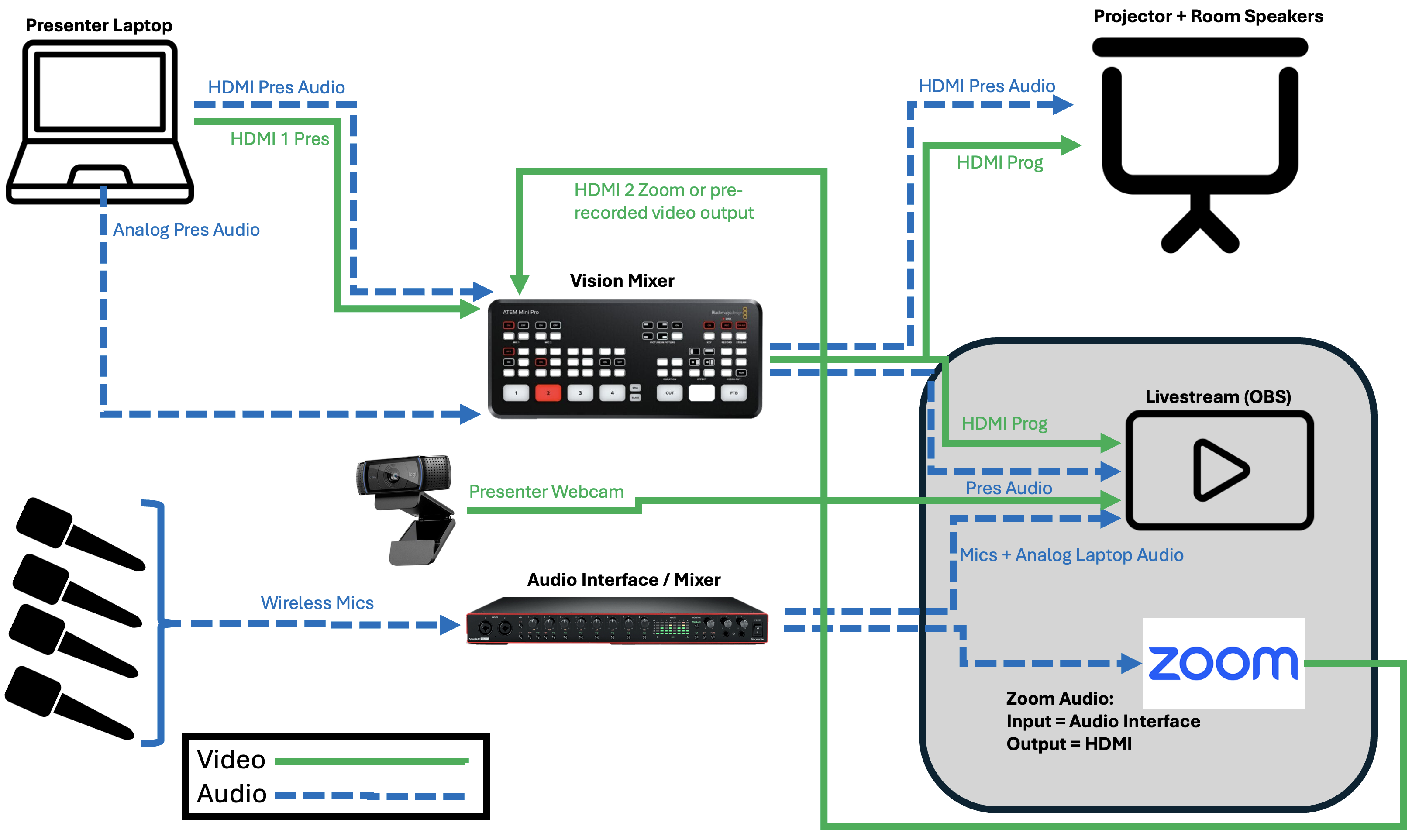
In OBS, we took in the audio from the audio interface (the wireless mics) as well as the audio from the vision mixer feed (the HDMI and 3.5mm jack audio). For video, we took in the vision mixer feed (containing either the presenter HDMI feed or streaming laptop HDMI feed for Zoom and video playback).
To have remote presentations over Zoom, we needed a way for them to hear the wireless mics without hearing an echo of themselves (effectively provide a mix-minus feed). This is where having the audio interface for mics and vision mixer for presentation audio came in handy - we could use the audio interface as the input to Zoom and the HDMI as the output for Zoom audio. This meant that the Zoom presenter didn’t hear themselves, but their audio still went to the room and to the stream (via the vision mixer).
Evening Concerts
The evening concerts were in two different venues within Rich Mix. As there was generally only 10-20 minutes break to move between the venues (with one on the 4th floor and the other on the ground floor), we effectively required two separate streaming rigs again. Again, a rough diagram of the setup is shown below:
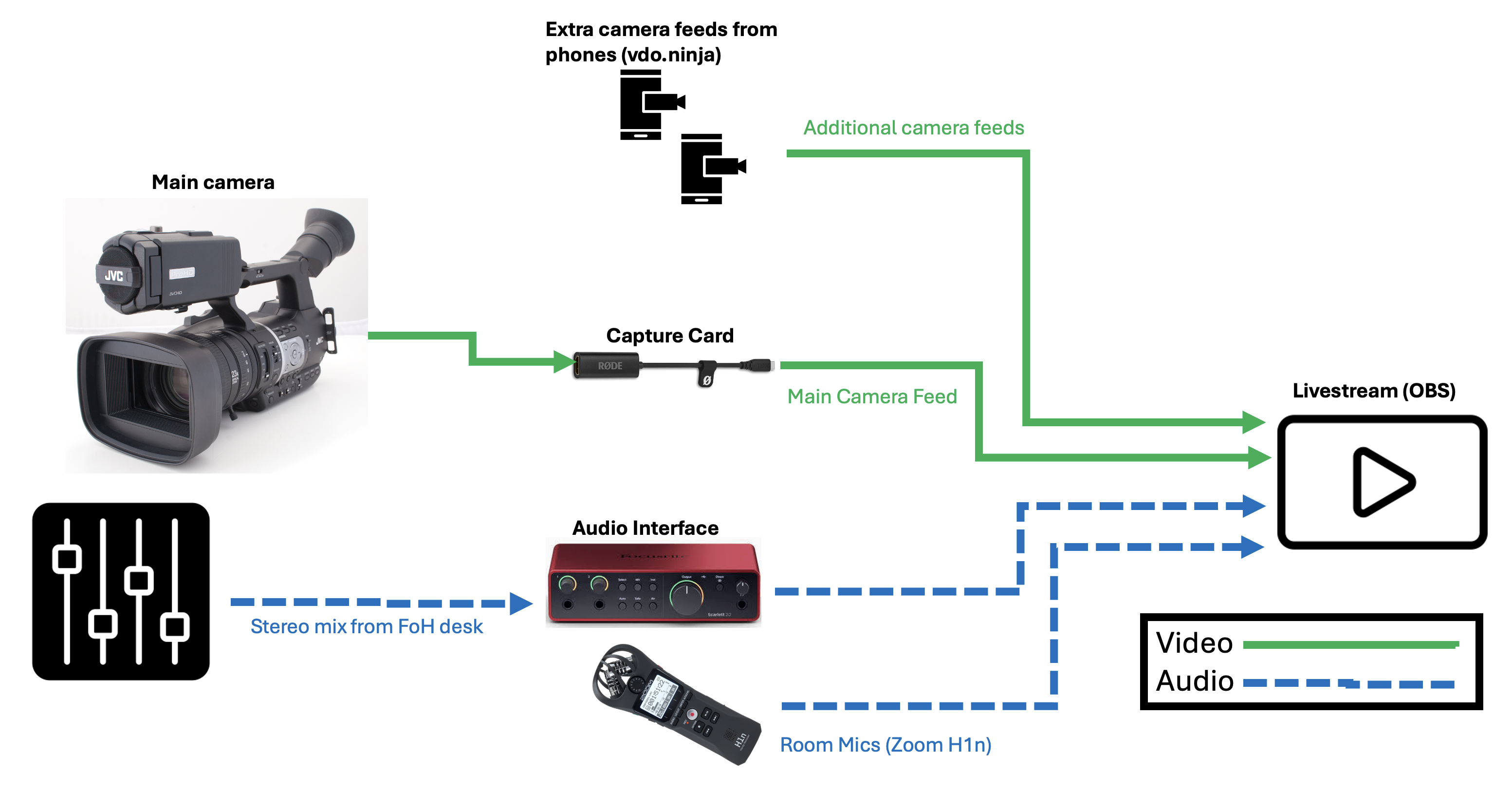
For audio, the Rich Mix technicians kindly provided us a stereo feed of the front-of-house mix in each room and we also had a Zoom H1N mounted to a camera in the back of each room (using it as a USB audio interface to function as a stereo room mic).
For video, we borrowed two JVC GY-HM600 video cameras (one for each room). These have a clean HDMI output (no information overlays) that went into a Rode HDMI Capture Card. We also used smartphones for additional angles. Generally, we had one for a wide shot at the back of the room (using either Apple’s continuity camera or vdo.ninja to get the feed into OBS) and an additional smartphone being operated handheld close to the stage for an additional angle, again using vdo.ninja.
Finally, though we didn’t take the feed into the streaming computer, we gave the stage managers a GoPro mounted on a microphone stand to use in each room. The HDMI output of this was displayed on the projector for some of the performances - which hopefully gave the audience a better view of some of the more subtle interactions onstage.
We had a laptop at the back of each room, with the various video and audio feeds for each room going into that laptop, running OBS. We wanted one continuous stream for the entire evening which presented a problem when the stream between laptops. Luckily, Jordie discovered that YouTube primary and backup stream URLs can be used for this purpose. We started one laptop streaming to the primary server then, when we switched rooms, we would start streaming in the other room to the backup server and stop the stream in the first room. This ensured that the stream remained uninterrupted.
The image below shows the setup we had for one of the spaces, with the JVC camera on a tripod on top of a table and the laptop running OBS next to it. 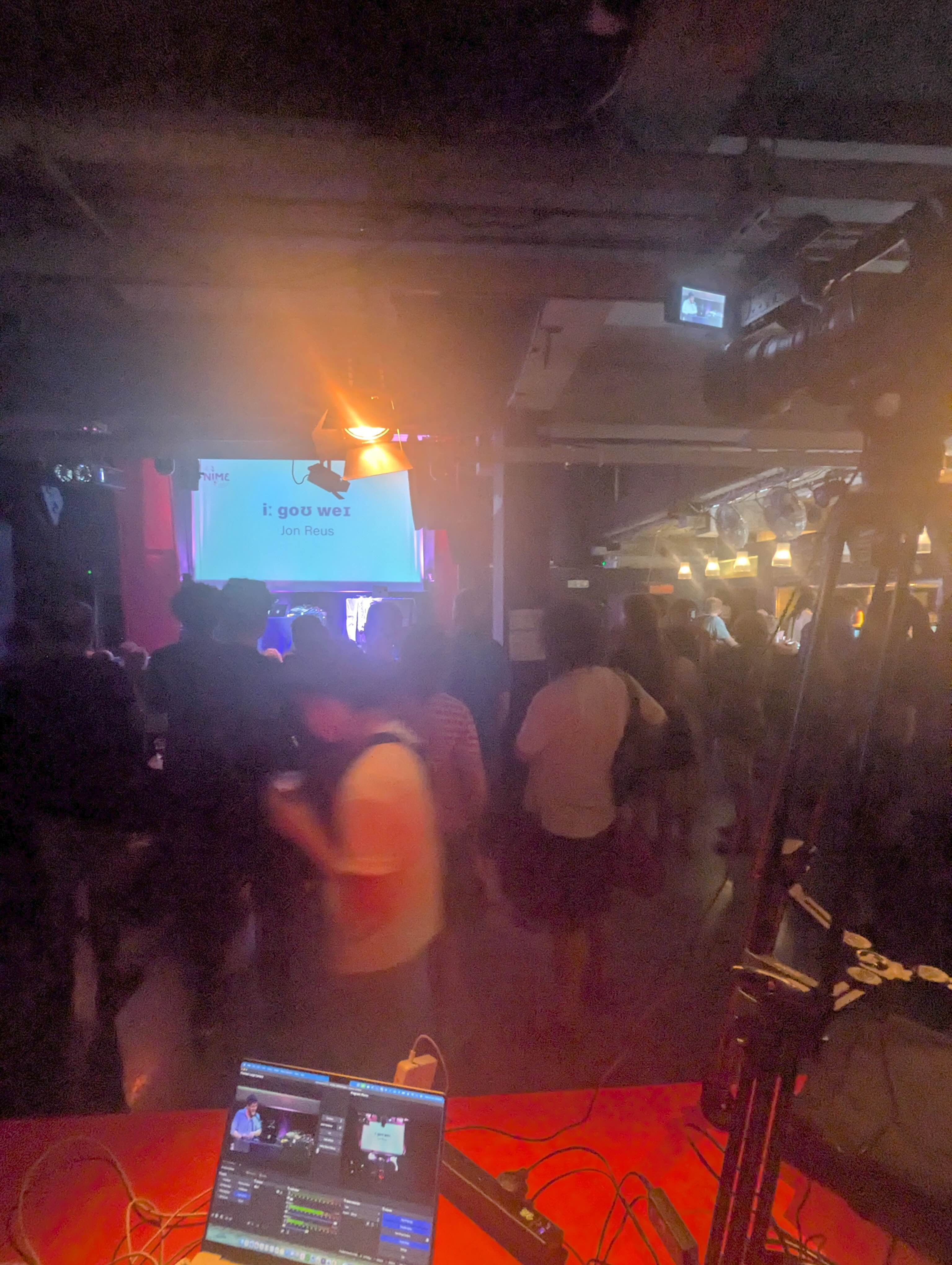
Cost
We were lucky in that we had a fair amount of AV equipment in our lab already, and we were able to borrow the rest from other institutions for the week. The only bits we had to purchase specifically for this were cables, adapters, and the 2x Rode HDMI capture cards (about £25 each).
Obviously this would’ve been more expensive if we hadn’t been in the fortunate position of having lots of the equipment already. The main expenses would probably be the vision mixers and cameras able to output a clean HDMI feed (the JVC GY-HM600s and GoPros, in our case).
Reflections & Improvements
Overall, the streaming setups were fairly successful! We had a few issues in one of the rooms (largely down to a dodgy HDMI cable - thanks to Ian Clester for loaning a replacement!) and some wireless mic issues at the start (fixed by a reset of the microphone system).
A spare HDMI cable running from the presenter podium to the vision mixer and a backup camera in the room somewhere that had a view of the projector would have both been handy for when things did go wrong. After swapping out that cable though, the setup worked pretty much flawlessly for the rest of the conference!
The other issue we occasionally had was that some laptops didn’t seem to like outputting audio to the Blackmagic ATEM Mini Pro (it would cause any audio playback to freeze and other weird symptoms). In these cases, we were glad that we had offered the option of audio via a 3.5mm jack as that proved to be a useful backup too!
It would have been nice to expand the setup for the evening concerts, though the turnaround time between finishing the daytime streaming at 5pm and starting the evening streaming at 7pm (with a cycle across to the venue in that time too) would’ve made a more complex setup difficult anyway. In particular these additions would’ve made life easier and make for a slightly better stream output:
- An external screen to show the OBS multiview window (this would’ve made switching camera shots easier)
- A larger screen mounted to the JVC GY-HM600 cameras (getting the focus right was difficult on the small built-in screen). Jordie sometimes used his phone to preview the OBS output for this, which helped!
- More camera angles (I considered loading the Magic Lantern firmware onto an old Canon DSLR I have to get a clean HDMI output and use that, but I ran out of time before the conference).
A Quick Thanks
Lots of thank yous go out to all the wonderful people who helped us out with the streaming (and other who did huge amounts of work to get the whole conference together while we were able to focus on one small aspect of it!). Massive thanks go to the AV staff at Loughborough University London and the technicians at Rich Mix for being so helpful - they made our lives much easier over the course of the week! Also big thanks to our wonderful colleagues June Kuhn and Adam Schmidt for assisting with camera operating at Rich Mix! Thank to all the NIME 2026 chairs but in particular the paper and music chairs who ensured that the paper sessions and concerts ran very smoothly - making our job of streaming them easier. Of course, thank you to Andrew and Courtney as general chairs - they put in an unbelievable amount of work to make the conference happen. Finally, thanks to Jordie for working together on the streaming (he also handled the setting up of the conference Discord - which he did a much better job on than I ever would have!).